No memory at all. Identical at both sinks, free on the video path, survives to the GPU backend untouched. Reach for this unless you cannot.
01What a plugin is
A plugin is one .NET assembly in its own folder under plugins/, beside the executable.
Nothing references it at build time. The host enumerates the folders at startup, loads each into its own
AssemblyLoadContext, and asks whatever it finds inside what it would like to contribute.
Two assemblies are host-owned: Flyback.Plugins, which is the contract,
and Flyback.Core, which is what a patch and a module are made of — the graph, the sockets,
the emitter a module lowers itself through, and the built-in modules a preset can name. A plugin
compiles against both and ships neither. That rule is not a convention; it is what stops the same type
having two identities and every cast across the boundary failing.
What runs a patch is a third assembly, Flyback.Engine: the compiler, the text language,
the renderers and the file formats. A plugin never references it, which is the point of keeping it
apart — it can change from one release to the next without a plugin built against an older one
noticing.
All three are left on disk beside the executable rather than folded into it, so the two you need are there to compile against. What you build keeps loading in later releases for as long as the contract it was built against is still offered — see Building and installing.
02The project file
Four things matter, and each of them fixes a specific failure.
<Project Sdk="Microsoft.NET.Sdk">

  <PropertyGroup>
    <RootNamespace>Flyback.Plugins.Yours</RootNamespace>
    <EnableDynamicLoading>true</EnableDynamicLoading>
  </PropertyGroup>

  <ItemGroup>
    <!-- Both are host-owned; shipping either gives its types a second identity. -->
    <ProjectReference Include="..\Flyback.Plugins\Flyback.Plugins.csproj"
                      Private="false"
                      ExcludeAssets="runtime"
                      GlobalPropertiesToRemove="OutDir" />
    <ProjectReference Include="..\Flyback.Core\Flyback.Core.csproj"
                      Private="false"
                      ExcludeAssets="runtime"
                      GlobalPropertiesToRemove="OutDir" />
  </ItemGroup>

</Project>EnableDynamicLoadingproduces the.deps.jsonthe resolver reads. Without it, nothing but the entry assembly resolves and your first dependency fails at load.Private="false" ExcludeAssets="runtime"compiles against the host's assemblies without copying them next to yours.- Name both references. Naming only
Flyback.PluginsleavesFlyback.Coreto be copied in as a transitive reference, which is the same bug by a quieter route. - Reference packages of your own freely. Your folder is your own load context, so your version of something does not have to agree with anyone else's.
Without the source
That project sits inside this repository, beside the two it references. A plugin of your own need not: an installed Flyback has both assemblies beside the executable, and they are all there is to compile against.
<Project Sdk="Microsoft.NET.Sdk">

  <PropertyGroup>
    <TargetFramework>net10.0</TargetFramework>
    <EnableDynamicLoading>true</EnableDynamicLoading>

    <!-- The folder Flyback is installed in: the one holding the executable. -->
    <Flyback>C:\Path\To\Flyback</Flyback>
  </PropertyGroup>

  <ItemGroup>
    <Reference Include="Flyback.Plugins" HintPath="$(Flyback)\Flyback.Plugins.dll" Private="false" />
    <Reference Include="Flyback.Core" HintPath="$(Flyback)\Flyback.Core.dll" Private="false" />
  </ItemGroup>

</Project>Private="false"does here what it does above: your output is your assembly and its.deps.json, and neither of the host's.- Leave
Flyback.Engine.dllalone, though it sits in the same folder. Nothing a plugin is handed comes from it, and a plugin that references it is bound to the one release it was copied from. - The release you compile against sets the oldest Flyback your plugin loads in, not the newest — see Building and installing. Build against the oldest one you mean to support.
03The entry point
One public, non-abstract class with a parameterless constructor implementing
IFlybackPlugin. The host finds it by reflection, constructs it, and calls
Register once.
[assembly: FlybackModule(YourModule.TypeId, "Yours")]  // one per module Register adds

public sealed class YoursPlugin : IFlybackPlugin
{
    private static readonly ModuleProvider Provider = new("yours", "Your modules");

    public PluginInfo Info { get; } = new(
        "yours",                       // stable, machine-readable
        "Your modules",                // what a person sees
        "One line about what this is.");

    public void Register(IPluginRegistry registry) =>
        registry.AddModules(Provider, [ YourModule.Definition ]);
}
The one hard rule about Register
It runs on the UI thread during startup, for every installed plugin, before the window is usable.
It must be cheap, and it must not open a device, read a credential, or reach the network. Deciding
whether something can actually run belongs on the thing being registered — that is what
IsSupported is for.
Declare every module Register adds with a FlybackModule on the assembly,
giving the type id and name its NodeDef has. It is how the install dialog and the shared
plugins site list your modules without running your code. Flyback checks it after Register:
a plugin that registers a module it did not declare, or under another name, is refused whole, and the
plugins window names the module. A module declared and not registered is fine, for one you leave out on some
systems. flyback-cli pack-plugin loads your build and runs the same check before it writes a
package.
Nothing stops an assembly holding more than one plugin class, and each is instantiated. Two plugins
claiming the same Info.Id is refused: the first wins and the second becomes a note in the
plugins window.
04What you can contribute
IPluginRegistry has six methods. New kinds of extension arrive as new methods, so a
plugin compiled against an older contract keeps working.
| Method | Contributes | Must not, when registering |
|---|---|---|
AddModules | Modules in the palette, keyed by a provider | — |
AddPresets | Patches in the preset gallery | — |
AddAudioOutput | A sound backend | Open a device |
AddSecretStore | Somewhere the OS holds a secret, honored only from a plugin Flyback ships or one allowed with --secrets | Read or write one |
AddPatchAssistant | Something that can author a patch, sending over the IAssistantTransport it is handed: the host puts the key on requests to the one origin it was entered for, and the assistant never holds it | Open a connection, or need a credential present |
AddMidiInput | A MIDI backend | Open a device, or list the ones plugged in |
A single plugin may call several. The Voice plugin adds eleven modules and four presets; a platform plugin such as WinIO adds a sound backend and a MIDI input and nothing else. Every kind is keyed by an id, and an id registered twice is refused to both, whichever plugins it comes from, so no folder can stand in for a plugin it shares an id with.
05Authoring a module
A module is one NodeDef: its sockets, and a function that lowers it to ops. It is the
same data the built-in modules are declared with — there is no second-class plugin module. Adding one
changes nothing else in the pipeline; it appears in the palette and compiles on its own.
public static NodeDef Definition { get; } = new(
    "yours.rings", "Rings", "Pattern",
    [
        new PortSpec("x", NormalledTo: NodeCatalog.Across) { Standard = true },
        new PortSpec("y", NormalledTo: NodeCatalog.Down) { Standard = true },
        new PortSpec("freq", PortKind.Scalar, 4f, 0f, 32f) { Help = "Rings from the middle to the edge." },
    ],
    [new PortSpec("out") { Help = "The rings, -1 to 1." }],
    (em, i) =>
    {
        var radius = em.Binary(OpCode.Hypot, i[0], i[1]);
        return [em.Unary(OpCode.Sin, em.Mul(em.Mul(radius, i[2]), MathF.Tau))];
    },
    "Concentric sine rings.");
The type id prefix rule
Every type id must begin with your provider's id and a dot. That single rule does three jobs: it makes shadowing a built-in impossible, it makes a collision between two plugins impossible, and it means the provider of a module can be read off a saved patch file without having the plugin that defines it. Ids that break it are dropped individually — one bad module costs that module, not the plugin.
Sockets
PortSpec carries more than a name. Most of it is the editor's business rather than the
compiler's: a stored number means the same thing whatever these say.
| Field | What it does |
|---|---|
Help | Set with { Help = … }: what this one socket is for, in a sentence or two that stand on their own. The inspector shows it as the tip on the socket's row, outputs included, and the assistant reads it when it looks the module up. What the module is for, and how its sockets work together, goes in the NodeDef's description, which heads the inspector. Give every socket one. |
Standard | Set with { Standard = true } in place of Help where the socket means what its name means everywhere: x and y, freq, phase, amp, bias, mix and the rest of SocketHelp.Inputs and SocketHelp.Outputs, and any domain input. Its help is then the standard for its name, the same words as on every other module. A socket that asks for a name with no standard is a mistake in the plugin: the module is refused, and the refusal names the socket. |
Kind | Scalar, Color, or Any. Any passes through whatever arrives, which is how one Expression works on both a tone and a picture. |
Default, Min, Max | The knob on the node, and the range the editor gives it. A Color input has no knob at all: a single number cannot hold a color, so it takes a wire only. On an output, Min and Max say what it puts out — -1f, 1f for a wave, 0f, 1f for an envelope — and an Auto remap wired to it reads them. Left at the default −4 to 4, a socket has no range, and an Auto remap asks for plain numbers there. A Color socket is always 0 to 1. |
Lenient | Set with { Lenient = true } on an input where a value past either end of the range still means something: a phase or a hue wraps round, a gate or a trigger reads a threshold. A wire swinging past any other input's range is drawn in orange and warned about. |
Knee | Set with { Knee = … }, and the knob sweeps evenly below it and in decades above it. Give a frequency a knee at the bottom of its range, and every octave gets the same turn of the knob and of an Auto remap. |
NormalledFrom | Index of an earlier input this one falls back to when nothing is patched in — the hardware normalled jack. The Output's right carries left this way. |
NormalledTo | A module driving this input while nothing is patched into it, named as new PortNormal(typeId, port). The module is hidden — no node, no wire — and one instance is shared by every socket normalled to it. The socket then has no knob: the value stored against it is never read, so the editor names the module where the number would be. Name a module the engine ships (NodeCatalog.Clock is Time, Across and Down are Coordinates) or one of your own; a type id the running catalog lacks drops the socket back to its knob. |
Display | Number, Note (57 reads as A3), Duration (a power of ten of seconds, shown as the time it is), Integer (a whole-number setting), or Chord (a Chord's pick, 4 reads as maj). Note, Integer and Chord step rather than slide. |
Domain | True when this is the axis the module is read across rather than a value it uses. A constant on one is never sensible, which is why every domain in the catalog is NormalledTo Time; the compiler still warns about one that is normalled to nothing. |
Swept | True when the module supplies the domain this input is read under. Resolve it yourself with EmitContext.Resolve. |
PatchOnly | True when Default is a filler nobody should dial, kept only so the compiler has something to read while nothing is wired in. The editor draws no knob for it and says what the socket does instead. The Output's left is one. |
Which sink a module is for
Every module is compiled for both sinks, because a patch is one graph. Sinks, an init
property on the NodeDef, says where it means what it says: ModuleSinks.Both (the
default), Audio for a module that wants a memory and gives the screen something simpler, or
Video for one that wants a pixel or a past frame. It changes nothing that is emitted; the
assistant's handbook reads it, so set it whenever it is not Both.
How a module is drawn
By default a module is drawn as its category, and a category the engine does not know draws gray
(ADR-0116). Skin, an init property on the NodeDef, gives a module a background
of its own instead. Only the background changes. The block keeps its shape, its header,
where its title sits, its sockets and its description — a canvas of modules that each laid themselves
out differently would stop being a patch.
There are three backgrounds. Colors are a Swatch(red, green, blue), because Core names no
toolkit. Picture, Voice, Effects and Mastering all stay in the family this way — Circle, Bell and the
Compressor among them — a Palette whose Accent is its own category's, with a
Glyph of its own rather than the category's.
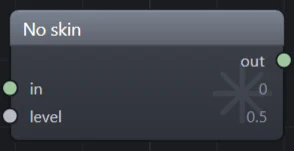
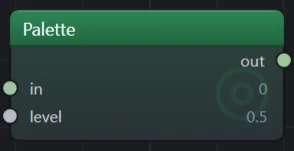
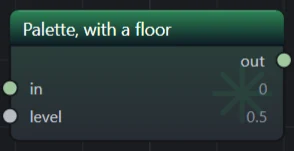
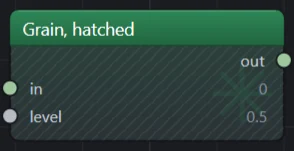
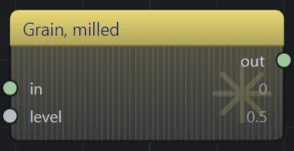
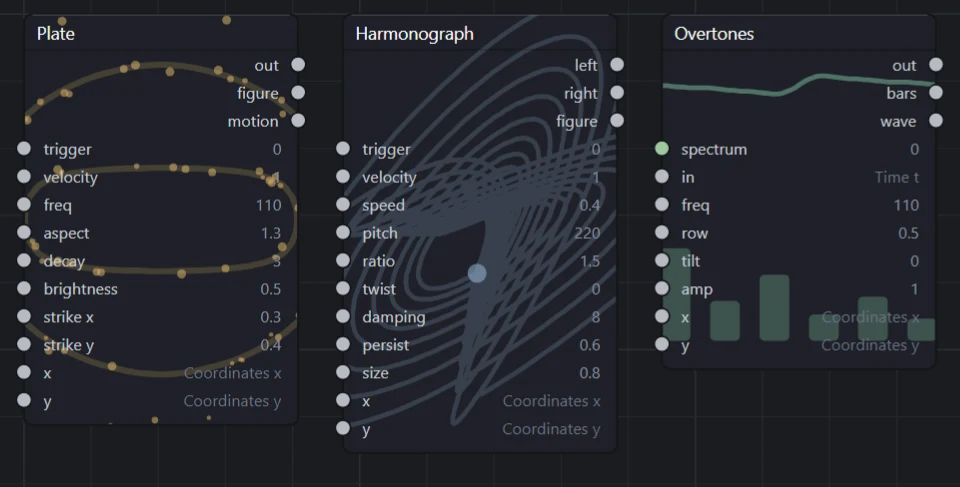
ContrastText: the title went dark and the socket labels stayed light, because they sit on different surfaces.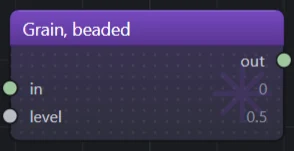
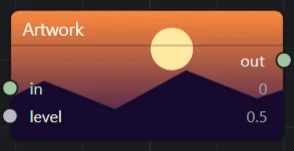
Those are drawn by the canvas itself rather than mocked up, from the same code the app paints a
patch with — see SkinShotTests, which is what retakes them.
// A palette: drawn exactly the way every built-in module is.
Skin = new ModuleSkin.Palette(new Swatch(0x2E, 0x8B, 0x57))
{
    Floor = new Swatch(0x10, 0x20, 0x30),
    Glyph = "M4,12 A8,8 0 1,1 20,12 A8,8 0 1,1 4,12",
}

// A grain: the same palette with a texture cut across it.
Skin = new ModuleSkin.Grain(new Swatch(0x4A, 0x7E, 0xC8), GrainCut.Beaded)

// A picture: SVG, PNG or GIF, scaled to cover the body and clipped to it.
Skin = new ModuleSkin.Artwork(bytes) { ContrastText = true }

// Two pictures: the block's, and one of the panel's own shape.
Skin = new ModuleSkin.Artwork(block) { Panel = tall }| Field | What it does |
|---|---|
Palette.Accent | The one color everything is worked out from, standing exactly where the category's accent would: the wash down the body, the band across the header, and the mark behind the labels. |
Palette.Floor | What the wash falls to at the floor. Left out, it falls to the accent, the way a built-in module does. |
Palette.Glyph | The mark across the body, as SVG path data on the same twenty-four unit box the engine's own marks are drawn on. Stroked, not filled. Path data that will not parse draws nothing rather than taking the canvas down. Left out, the category's mark stands. |
Grain.Cut | Hatched (diagonal rules), Milled (fine upright rules) or Beaded (a grid of dots), tiled over the body in graph units so the texture holds its pitch at any zoom. A grain is a palette and carries all of its fields; the cut is a second channel, and the one that still says whose the module is in a grayscale screenshot or to somebody who cannot separate two hues. |
Artwork.Bytes | The picture itself, most often read out of the plugin's own embedded resources. Bytes rather than a path, so a skin needs nothing deployed beside the assembly. Bytes that are not a picture are no picture: the module falls back to its category. An animated GIF runs, and the canvas repaints only while a module that is animating is actually on it. |
Artwork.Panel | A second picture for the panel on the right, where Bytes is the block's. The two surfaces are different shapes — a block is a wide strip a few sockets tall, the panel is most of a column — and cover crops whatever does not fit. Left out, the one picture is drawn on both. |
ContrastText | On any of the three. Whether the text on the module is worked out from the background behind it rather than drawn white — see below. |
The person using Flyback has the last word. Two switches under Settings → Canvas answer two different complaints. Let a plugin paint its own modules, cleared, draws every module as its category and ignores every skin, which is what somebody who does not want a plugin choosing how their patch looks is asking for. Play animated module backgrounds, cleared, holds every animation at its first frame. Write a skin that is worth having and neither gets cleared; write one that fights the canvas and it will be.
Text that can be read on any background
Every module on the canvas is titled in white, and a module that picks a dark color should not be the
one whose title is a different color from every other. So white stays the default and
ContrastText is opt-in. It is for the case the shell cannot rescue on its own: a pale,
saturated or busy background, where white is simply gone.
Where it is asked for, every line of text on the module — the title, the socket names, the numbers, the normalled module names — is derived from the background that line covers, by one rule with no table in it. The ink is the inverse of what is behind it, driven toward whichever pole the background is not until the two are half the luminance range apart. Inverting alone is the obvious rule and it fails silently in the middle: a mid-gray inverts to itself. The drive is solved for rather than stepped, so text over a gradient stays continuous instead of breaking where a threshold would have been, and the direction is decided once for a whole surface, so a word is never dark at one end and light at the other. Over a picture the same rule reads the artwork's own horizontal bands in place of the gradient's stops.
Carrying something that is not a knob
A socket carries a number a patch can drive. Some decisions are not that — they are decisions
about the piece rather than signals in it, and no arrangement of sockets expresses one.
The engine carries its own that way: a sequencer's notes, a Quantiser's scale, an Arrangement's parts, a Sample's file.
Your module can carry its own by declaring a NodeExtra.
You declare a key and the values it holds. Everything else — seeding a fresh instance, storing it in the patch file, folding it onto the context your emit function reads, describing it to the assistant — has a default written in terms of that declaration, so there is nothing else to override.
public sealed record GlideExtra : NodeExtra
{
    public override string Key => "glide";

    public override IReadOnlyList<ExtraField> Fields =>
    [
        new ExtraField.Number("time", "time", new PortSpec("time", PortKind.Scalar, 0.1f, 0f, 1f))
        {
            Help = "How long a note takes to slide to the next, in seconds.",
        },
        new ExtraField.Toggle("legato", "legato") { Help = "Slides only between notes that overlap." },
    ];
}

// on the NodeDef
Extras = [new GlideExtra()],

// in the emit function
var state = node.Extra<ExtraState>("glide");
var time = state?.Number("time") ?? 0.1f;
You do not ship a control. The shell draws the rows from what you declared, which is
why a plugin never references Avalonia and is never pinned to the version of it a given build shipped. An
ExtraField.Number takes a whole PortSpec, so your row gets the same slider,
snapping and formatting a socket's knob has — declare Display as Note and 57
reads as A3, exactly as it would on a knob. Give every field a Help, as you would a socket:
the inspector shows it as the tip on the field's row, and describe_module and
flyback-cli modules print it beside the field's key.
The same declaration is what lets an assistant set your state, through one set_extra tool
that works for any plugin's kind. There is nothing to write for it.
Four shapes exist. Number and Toggle are a value and a switch;
Choice picks one of a list of ChoiceOption(id, name), read afresh each time the
row is drawn, so the list can be computed — MIDI In uses one to choose its instrument — and is read back
with state.Chosen(key). A stored id that is not in the list is kept rather than reset, since it
is usually a device that is unplugged right now. Text is a line somebody types, read back with
state.Text(key); an Expression's formula is one. The vocabulary grows only when a plugin is genuinely
blocked on another shape. What it deliberately cannot express is a control of your own: no
keyboard, no waveform display, no list you reorder. The engine's own three kinds all needed one, and none
of them could have been written as a plugin. If yours is that shape, say so — the trade is recorded in
ADR-0055 and is meant to be revisited by a real case, not guessed at.
Your values live under your key in the patch file and are round-tripped whether or not the plugin is loaded, so a patch opened without you keeps what it carried. What arrives is only ever what somebody could have typed into the file, so every read is held to the range you declared — a number outside it is clamped rather than refused, and nonsense reads as your default.
The emit function
It runs once, at compile time, and writes straight-line ops into a flat register machine. This is the fact that shapes everything else about writing one:
- It never sees a knob's value, so nothing about the shape of what you emit can depend on one. The Supersaw has seven voices rather than a knob's worth for exactly this reason.
- There are no branches. A choice is arithmetic —
Step,Mix,Clamp— not anif. - It runs whole or not at all. Reaching for one output compiles everything upstream of all your inputs, because the compiler cannot know which output uses which.
- Loops that unroll are fine and normal. Seventy ops with no branches is what the Supersaw is.
The Emitter gives you the instruction set: Unary, Binary,
Ternary over OpCode, plus Constant, Load for the
pixel's x, y and t, and shorthands Add, Sub, Mul. Widths broadcast
the way a shading language would: a scalar meeting a color is applied to all three channels.
06Modules that remember
The engine renders a picture by evaluating the program once per pixel, with rows in parallel and in no
particular order. That is why most modules are pure functions of (x, y, t) — and why a module
with a memory is a different kind of thing, which works for the speakers and has to say what it means for
the screen.
There are four tiers, and it is worth knowing which one you need before you start.
A cell that carries a value from the last evaluation to this one. Filters, allpass stages, slew limiters, sample-and-hold. Available to any plugin, no engine change.
A cell the screen keeps too: one value per pixel, carried from the previous frame. What a loop drawn on the canvas uses. Available to any plugin; ask for one only when a picture should accumulate.
Thousands of past samples — a delay line or a reverb tail. Needs an opcode, so it cannot come from a plugin; use the two that exist.
Taking a cell
AllocateUnitSlot hands you a cell; UnitRead gets what it held last
evaluation and UnitWrite puts this evaluation's value in it. Read before you write, and the
gap between the two is the one evaluation of latency that makes it a memory.
var cell = em.AllocateUnitSlot();
var previous = em.UnitRead(cell);        // what it held last time
var smoothed = em.Ternary(OpCode.Mix, previous, input, amount);
em.UnitWrite(cell, smoothed);           // what it holds next time
A value written to a cell is clamped to the rails on its way in, which keeps a bad value from
persisting. A cell holding a time rather than a signal — where a trigger arrived, say — is written with
ClockWrite instead, which is not clamped.
Taking a plane
AllocatePlaneSlot, PlaneRead and PlaneWrite are the same three
calls, but on the video path the value is kept for each pixel from one frame to the next: a trail that
decays, a per-pixel envelope, a reaction-diffusion step. On the audio path a plane behaves like a cell.
Do not reach for one to make a filter work on a picture: a filter over frames is a different effect, and
every plane costs a value per pixel.
Lowering part of a module once
A module read through a Swept input is lowered once per place it is read at. Whatever
of it does not depend on the place can go behind em.Once(key, inputs, lower), which lowers
it the first time and hands the same slots back wherever inputs and the x, y and t it read
are the same. Name every slot lower reads that it did not make; x, y and t are noticed on
their own. State claimed inside is claimed once, so a strike kept in planes is one strike however many
places the module is read at.
var ring = em.Once("ring", [trigger, velocity], () => Ring(em, trigger, velocity));The two questions every stateful module has
Both are answered by the emitter, once per program rather than once per module, so four filters in one patch cost two cells between them and not eight.
em.Interval()— how far the clock moved since the previous evaluation. Nothing tells a module its sample rate; this is the sample rate, said the other way round. It is what turns a cutoff in hertz into a coefficient.em.HasMemory()— one where the program has state behind it, zero where it has none.
The second matters more than it looks. An emit function runs at compile time, long before anything knows which sink is about to run the program, so this flag is the only way to ask. Mixing on it gives the video path an answer you chose:
// A picture is one evaluation with nothing before it, so what a filter
// sees there is a signal that never moves — and its response to that is
// everything through the lowpass and nothing through the other two.
var live = em.HasMemory();

return
[
    em.Ternary(OpCode.Mix, dry, lowpass, live),   // a wire, with no state
    em.Mul(bandpass, live),                       // silent
    em.Mul(highpass, live),                       // silent
];
What the video path does on its own
With no state passed, UnitRead gives zero and UnitWrite goes nowhere
(only a plane is kept), a
Delay hands its input straight through, and Phase becomes the multiply it
replaced. Those fallbacks are total and will not crash — but whether they mean anything is
yours to decide. A delay line becomes a wire for free; a bank of allpass stages becomes whatever the
arithmetic happens to leave, which is why it should say so explicitly instead.
A module for the eye has one more gate
The preview draws on the GPU wherever it can, and the one thing the shader cannot draw at all is a
table read — em.Table, which is a clip or a trace. A video program containing one takes the
preview back to the CPU for as long as that patch is loaded, and nothing anywhere says so. Cells and
delay lines are milder: they lower to the same no-state fallback the interpreter uses on the video path,
so the two backends still agree. Planes are kept by the shader as well, as channels of a float render
target; a graphics context that cannot provide one draws the frame on the CPU instead. If your module is for the picture, keep it to arithmetic and pin it
with a test that GlslEmitter.Emit is happy in every dialect — that test is the complaint
the shader has no way to make. The Picture plugin's tests do this for its modules.
Buffers
For a real delay, em.DelayLine(OpCode.Delay, input, feedback, time, maximum). The time is
a signal and may be swept — reads interpolate, so it glides rather than steps — but the maximum is fixed
at compile time, because it sizes a buffer and a buffer cannot be resized from the audio thread.
OpCode.Allpass is the same shape and smears without coloring.
Note the cost: two seconds at the oversampled audio rate is about 1.5 MB per line. Ask for what you need.
07Shipping a patch
A preset is how a plugin shows its modules wired up properly. It is a name and a function, and the function is handed the catalog when the preset is picked, not when it is registered — so it can freely use the modules the same plugin just added.
A third argument is a line saying what the preset is for. The patch it builds carries it as its own
description, unless the patch sets one itself with patch.Describe(...), and that is what the
gallery shows under the name.
A fourth argument, the PresetKind, says which heading of the preset gallery it belongs under:
Idea for one idea at one sink, which is the default; Interplay where sound and
picture are the same thought; Showcase for a whole piece. Say which, or yours is filed as an
idea whatever it is.
Flyback turns every one- and two-input Maths module in your preset into an Expression as it is built, folding chains of them into one formula, and lays the patch out again. The result sounds and looks exactly as you wired it, so wire the arithmetic whichever way reads best in your code.
registry.AddPresets([new PatchPreset("Your preset", Build)]);

static Patch Build(ModuleCatalog modules)
{
    var b = new PatchBuilder(modules);

    var coord = b.Add("coord");
    var rings = b.Add("yours.rings", (2, 2.5f));   // (port, knob)
    var output = b.Add(NodeCatalog.OutputTypeId);

    b.Wire(coord, 0, rings, 0)
     .Wire(coord, 1, rings, 1)
     .Wire(rings, 0, output, NodeCatalog.OutputColorPort);

    return b.Build();
}
A preset that plays a sound file or shows a picture carries it inside your plugin. Embed each file under a
folder of its own, name it in the patch by its name in that folder, and hand the preset the folder with
PresetFiles.Embedded. The files open with the preset as a bundle's do, so it plays on a machine
that has never had them, and saving it keeps them beside it.
<!-- in the .csproj -->
<EmbeddedResource Include="Speaking\*.wav" LogicalName="Speaking/%(Filename)%(Extension)" />

new PatchPreset("Speaking", Build)
{
    Files = PresetFiles.Embedded(typeof(YourPlugin).Assembly, "Speaking"),
};

// and in Build, a Sample named by the file's name in the folder
SampleExtra.Set(b.Add(NodeCatalog.SampleTypeId), "hello.wav");
Nothing in that says where a module sits, and nothing should: a preset states what the patch is and
what is wired to what, and b.Build() puts the coordinates on with the same layout the Tidy
button and the text language use, so the patch reaches the canvas already reading left to right. Taking
b.Patch instead hands over a pile at the origin — the trade is recorded in ADR-0070.
Presets from plugins appear after the engine's own, so what the app opens on never depends on what is installed. Because a patch is keyed by type id, one that uses your modules records what it needs, and opening it somewhere your plugin is absent refuses cleanly rather than loading a broken graph.
A preset that reaches for another plugin's modules is allowed and worth a moment's care: it is
built when it is picked, so a missing plugin surfaces there. Check first with
modules.HasProvider(id) and throw something that names the plugin, or the reader gets a
module id they never asked about.
08Sound and MIDI backends
The application has no platform-specific code in it at all; every sound device is a plugin. A backend is two classes — one that offers itself, one that opens the device.
public sealed class JackOutput : IAudioOutput
{
    public string Id => "jack";
    public string Name => "JACK";
    public int Priority => 150;      // the shipped ALSA backend is 100, and loses
    public bool IsSupported => OperatingSystem.IsLinux() && JackIsRunning();

    // Optional: what the Sound settings tab shows for this backend.
    public IReadOnlyList<SettingField> Form(SettingValues values) =>
    [
        new SettingField.Pick("port", "Port", JackPorts(), "system"),
    ];

    public IAudioDevice Create(AudioFormat format, SettingValues settings) =>
        new JackDevice(format, settings.Text("port", "system"));
}
IsSupported must answer without opening anything and without throwing — that is what lets
a plugin for another operating system stay loadable everywhere. Higher Priority wins; ties
break on Id.
Form is how a backend gets settings without the application knowing what they are. It
declares fields in the same vocabulary an assistant uses — Text, Pick and
Switch — and the settings window draws them on the Sound tab, keeps the answers in
output.json under your backend's id, and hands them to Create at launch and
again on every Save that changes them, so the new device plays at once. Open nothing until
Start, which is what lets Save swap devices in place. Leave Form out and the tab
shows only latency. All three shipped backends use it to pick the output device.
The tab says whose rows those are: Played by WASAPI (shared mode), from the Windows sound and MIDI
plugin (win.io), taken from the Name and Id of your PluginInfo.
The MIDI tab says the same of whatever is hearing the keyboard, so name a plugin as you would want it
read there.
IAudioDevice.Start is handed a callback that fills an interleaved stereo buffer on the
audio thread. It must not block, allocate or throw. If you cannot honor the requested
format exactly, open the nearest thing you can and report the truth through
SampleRate.
MIDI inputs
A MIDI backend has the same shape: IMidiInput offers itself with an Id,
Name, Priority and IsSupported, and opens a device as an
IMidiPort. The shipped ones live in the same platform plugins as the sound backends.
public sealed class JackMidiInput : IMidiInput
{
    public string Id => "jack-midi";
    public string Name => "JACK MIDI";
    public int Priority => 150;
    public bool IsSupported => OperatingSystem.IsLinux() && JackIsRunning();

    // Asked afresh whenever somebody opens a picker.
    public IReadOnlyList<MidiPortInfo> Ports => ListPorts();

    public IMidiPort Open(string port, MidiCallback deliver) =>
        new JackMidiPort(port, deliver);
}
Ports must not open anything or throw: a device that vanished is a shorter list, not a
failure. Open may throw, for a device another program has taken. The callback runs on
whatever thread your backend hears on, so it must not block. Hand it a MidiMessage — a note
down or up, all notes off, or a controller, with velocity already scaled to 0–1.
MidiMessages.Of(status, data1, data2) turns the three raw bytes into one, so a backend only
unpacks what its platform delivers.
09Building and installing
Drop your build output into a folder under plugins/ beside the executable — assembly,
dependencies and .deps.json together — and allow it. A folder copied in by hand is a
stranger's code until somebody says yes to it, so a Release build loads it only once allowed, and only
while its files are as they were then; a Debug build loads every folder. Allow it once per build:
flyback-cli plugin allow plugins/Flyback.Plugins.Yours
flyback-cli plugin allow plugins/Flyback.Plugins.Yours --secrets
flyback-cli plugin list --json
flyback-cli plugin deny plugins/Flyback.Plugins.Yours
--secrets lets it register a secret store, which holds every assistant key typed from then
on. plugin list says which folders load and why the others do not. The yes is kept in the
data folder, never in plugins/. To ship a plugin in the box instead, add a line to
Flyback.App.csproj and the build lays it out for you, with the list of its files that lets it
load:
<PluginProject Include="..\Flyback.Plugins.Yours\Flyback.Plugins.Yours.csproj"
               FolderName="Yours" />
An optional Platform attribute — win, osx or
linux, matching the leading part of a runtime identifier — names the one platform the plugin
is for, and leaves it out of builds for anywhere else. A module plugin wants no platform at all, so that
it goes everywhere.
What you compiled against has a version of its own, apart from the application's.
Flyback.Core and Flyback.Plugins share one number — the contract's — and it
moves only when something a plugin can see does: the major when anything was removed or changed, the
minor when something was added. The compiler stamps that number into your assembly, and the host reads
it back before running any of your code. A plugin from the same major, built against this minor or an
earlier one, loads in every release that offers it; anything else is refused with a line in the plugins window
saying which side needs replacing, rather than failing later on whichever thread first reached for what
had gone.
Shipping it as a package
To hand a plugin to somebody else, pack it as a .fbkp, signed with your key. Opening one
with Flyback shows what the plugin is and installs it only when asked, copying just the build for the
system it is on. Installing is the yes that lets it load, for the files it unpacked and no others.
flyback-cli plugin-key -o ripple.key
flyback-cli pack-plugin Flyback.Plugins.Ripple.csproj -o ripple.fbkp --key ripple.key
flyback-cli pack-plugin bin/Release/net10.0 -o ripple.fbkp --key ripple.key
flyback-cli plugin describe ripple.fbkp --json
Make the key once and keep it, out of the repository. Every package of the plugin is signed with it, because Flyback takes a package as an update to the plugin installed only when the same key signed both; signed with another, it is a different plugin under a name already taken, and is refused. A lost key means your users remove the plugin before the next build will install. A package nobody signed is shown, but not installed, except by a Debug build of Flyback, which checks no keys.
Given a project, or a folder holding one, it runs dotnet publish once for each runtime
the project's <RuntimeIdentifiers> names, or once portably where it names none, so it
needs the .NET SDK. Given the folder the SDK already built into, it needs nothing: publish/,
or the folder itself, is the build for any system, and each win-x64/publish/,
osx-arm64/ and so on is that system's. Two runtimes for one system are refused, since a package
holds one build for each. It holds each build to the project file above, refusing
one without the runtimeconfig.json that EnableDynamicLoading writes, or one
carrying a copy of Flyback.Core or Flyback.Plugins. Then it checks the package
the way the editor will, and prints what the install dialog is going to show.
plugin describe prints the same for any package, yours or somebody else's, running none of it,
and says why the editor would refuse one it would.
The package is a zip with a folder per system — win, osx,
linux, or any for a build that is the same everywhere, used where there is no
folder for the system itself — and nothing else. There is no manifest to write. The dialog reads the
plugin assembly's own metadata without running any of it:
- its name, version, author and description, from
<Product>,<Version>,<Authors>and<Description>in your project; - its tags, from an
AssemblyMetadataitem namedTags, split at commas and semicolons; - its preview, from a PNG or WebP of up to 1 MB embedded as
preview.pngorpreview.webp; - what it adds — modules, presets, a sound output, a MIDI input, an assistant, a secret store — from
the
IPluginRegistrymethods your code calls; - its modules, by name, from its
FlybackModuledeclarations; - what it reaches — the network, files, other programs, the registry, native code, code it loads while running — from what any assembly in the build names.
<PropertyGroup>
  <Product>Ripple</Product>
  <Version>1.2.0</Version>
  <Authors>Ada</Authors>
  <Description>Rings that spread from wherever a note lands.</Description>
</PropertyGroup>

<ItemGroup>
  <AssemblyMetadata Include="Tags" Value="texture; feedback, generative" />
  <EmbeddedResource Include="preview.webp" LogicalName="preview.webp" />
</ItemGroup>
Each build holds exactly one plugin assembly at its top, and its name is the folder it installs into:
plugins/Flyback.Plugins.Ripple. A second package of the same assembly, signed with the same
key, replaces the first whole at the next start: the dialog offers it as an update, a reinstall or a
downgrade by comparing its <Version> with the installed one. A package never replaces a plugin it did not install, never brings a second
copy of one already loaded, and loads after every other plugin, so an id it shares with one is its to
lose.
Flyback refuses a package outright if a file in it could land outside the plugin's folder
(.., a drive, a backslash, a name Windows keeps for a device), if two of its files differ
only in case, if it is larger than 128 MB, or 512 MB unpacked, or if its plugin embeds two previews, one
larger than 1 MB, or one that is not the image its name says. The Install button is off, with the
reason under it, when there is no build for this system, or when the plugin or any assembly it carries
was compiled against a contract this Flyback does not offer, or when it adds modules and declares none;
the dialog shows which versions of
Flyback.Plugins and Flyback.Core it was built against. It also shows the
fingerprint of the key that signed it and the package's SHA-256, for comparing with what you publish.
A package changed after it was signed is refused.
Sharing it
To offer a package to everyone, submit it to the plugin site, where Figures, Fractals and Easy, Flyback’s own, are listed from the start. The site reads a package as the editor does, without running it, and refuses what the editor would. Once your plugin is published, its assembly name is your key's: a package of it signed with any other is turned away. What it lists comes from the package alone, so set the name, version, author, description, tags and preview above before packing. A package goes up unpublished and is listed once it has been reviewed; up to 64 MB is taken. A published plugin is found in Flyback's plugins window too, opened by the plug beside the settings button, which searches it alongside what is installed. Clicking a plugin there opens the same dialog as a package opened from disk, which offers the update where the site has a newer build and removes an installed plugin at the next start. A patch that will not open for want of your plugin names it and offers to find it, matched by a module the patch holds rather than by words, which is part of what declaring your modules buys. A shared plugin that misbehaves can be reported to the site’s admin from its page or from its Report… button in the plugins window. A plugin is rated with stars on its page, and the plugins window shows the average.
Two things that catch people out
Plugins are read once, at startup. Installing one means restarting the application, and a package's plugin is moved into place at that restart. The install dialog offers to restart for you.
The command line and the viewer have no plugins of their own. All three programs share one folder beside them, and the shell is what lays it out — so either run from its own build output, rather than from a publish, will not find your modules.
10How things fail
A broken, missing or hostile plugin is a note in the plugins window, never a program that fails to start. Failures are values rather than exceptions, and they are scoped as narrowly as they can be: one bad module costs that module, not the plugin and not the program. The plugins window marks each plugin that went wrong, one that did not load included, and hovering the mark says why.
| Situation | Result |
|---|---|
| A type id missing the provider prefix | That module is ignored |
| The same type id twice | The later one is ignored |
Provider id is flyback | Refused — reserved for the engine |
| Provider id already loaded, or blank | Refused |
| A provider claiming ids that already exist | Refused — it could answer for modules saved patches mean something else by |
Two plugins with one Info.Id | The second is ignored |
| A preset name already offered | The later preset is ignored |
| A sound backend, MIDI input, assistant or secret store id registered twice | Refused to both, and each is named |
| A folder nobody allowed, in a Release build | Not loaded, and listed as not yet allowed with the command that allows it |
| An allowed or shipped folder with a file changed since | Not loaded, naming the file |
| A secret store from a plugin not allowed to keep keys | Refused, and the plugin loads without it |
| A stray host-owned dll in your folder | Ignored, and the host's copy used |
A folder under plugins/ whose name starts with a dot | Never scanned |
| A package's plugin sharing an id with one shipped or copied in | The package's is ignored |
| Built against an earlier major of the contract | The plugin is ignored, and the plugins window says it needs rebuilding |
| Built against a later contract than this release offers | The plugin is ignored, and the plugins window says it needs a newer Flyback |
| A module registered that was not declared, or under another name | The plugin is ignored whole, and the plugins window names the module |
A throw from Register | The plugin is ignored whole, with what it registered before the throw, and reported |
| A throw from a preset | Reported; everything else carries on |
A provider appears only if at least one of its modules was accepted, so a patch can never come to require a plugin that contributed nothing.
11Testing
Test against the real plugin loaded off disk, not a stub — that way the thing under test is the thing
that has to work: a separate assembly, its own dependencies, and a deps file the resolver has to read.
Add a PluginProject item to the test project and load the catalog the way the app does.
The test project references Flyback.Engine as well, which the plugin never does. A
plugin says what a module lowers to; finding out what that sounds like means compiling and running it,
and that is the engine's half. Keeping the reference in the tests is what lets them use it without the
plugin being bound to a release.
<ProjectReference Include="..\..\src\Flyback.Plugins\Flyback.Plugins.csproj" />
<ProjectReference Include="..\..\src\Flyback.Engine\Flyback.Engine.csproj" />
To drive a module sample by sample, feed the signal in through the Coordinates module's x
and the clock through t. Evaluate takes both per evaluation, which makes it the
one way to push an arbitrary waveform through a module without building an oscillator to produce it.
var program = patch.CompileForAudio(catalog).Program;
var delays = new DelayState(program, rate);

var registers = program.AllocateRegisters();

for (var i = 0; i < signal.Length; i++)
{
    program.Evaluate(signal[i], 0f, i / (double)rate, registers, default, delays);
    output[i] = (float)registers[program.OutputBase];
}
Compile for video as well, and pin what your module does with no state — passing null
for the delays is exactly what the renderer does for a program that keeps no planes. A test that says "with no state this is a wire" is
worth more than one that says the filter filters.
flyback-cli check compiles both sinks of a patch and carries the answer in its exit code,
which makes it the one to put in CI.
12Rules of thumb
- Be a wire at zero. Every effect here is exactly its input at a mix of zero, and exactly a plain Saw at a detune of zero. It costs nothing and it makes a module comprehensible by turning one knob.
- Normalize as you go. Peak-normalize inside the module so turning a knob up makes the sound dirtier or wider, never louder. A module that gets louder as it does its job is one nobody can leave in a patch.
- Clamp what persists. Degenerate arithmetic is forgotten immediately; a bad value in a cell or a delay line is not, and turning the knob back down will not undo it.
- Type your maths ports
Any. A module that shapes a number shapes a color for free, and then it works at both sinks. - Decide what you mean on the screen. Not what the arithmetic leaves — what you would have chosen. Then write it in the description, so the palette says so too.
- Say it in the description. It is the only documentation a person gets while
patching, and the audio-only ones especially need it. The assistant reads it too, for as long as the
briefing has room. A module that has to be described can be added to
priority-modules.txt.